The Library
The Library is the home of every video in your workspace — recordings, uploads, and imports alike. Each card shows the thumbnail, title, summary, view count, and age, plus a quick action.
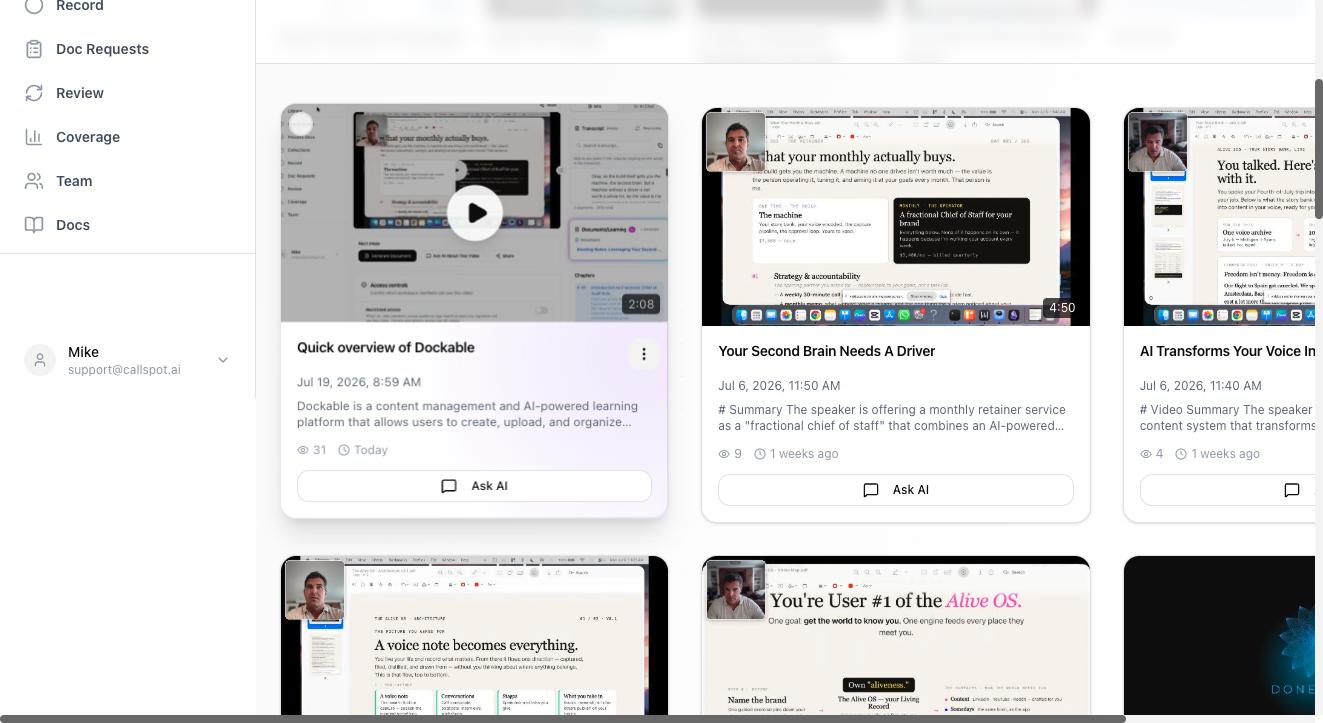
Reading a video card
- Ask AI on the card means the video is processed and searchable — click it to start asking questions about that video.
- Watch instead of Ask AI means the video has no transcript (a silent recording) — it's viewable and shareable, but not searchable.
- A Processing state means transcription and analysis are running; this usually resolves in a minute or two.
- The ⋮ menu on a card holds the rest: add to a collection, and other per-video actions.
Tabs at the top switch between videos, documents, screenshots, and audio content.
When something goes wrong
If a video shows Processing failed (or sits in Processing far longer than expected), open it and click Retry Processing. If it fails repeatedly, the error message on the video page says why — and it's worth checking that the uploaded file plays locally.
Deleting
Deleting a video removes it and everything derived from it — transcript, generated documents, and its search index entries. There's no trash can, so delete deliberately.
FAQ
Why don't older videos have thumbnails?
Thumbnails are generated at upload time. Videos uploaded before thumbnail support (or whose source tool didn't provide one) show a placeholder; re-uploading would generate one, but it's cosmetic.
Who can see the Library?
Everyone in the workspace sees the Library, but individual videos can be restricted with per-video access controls — see Video privacy and access.