The video editor
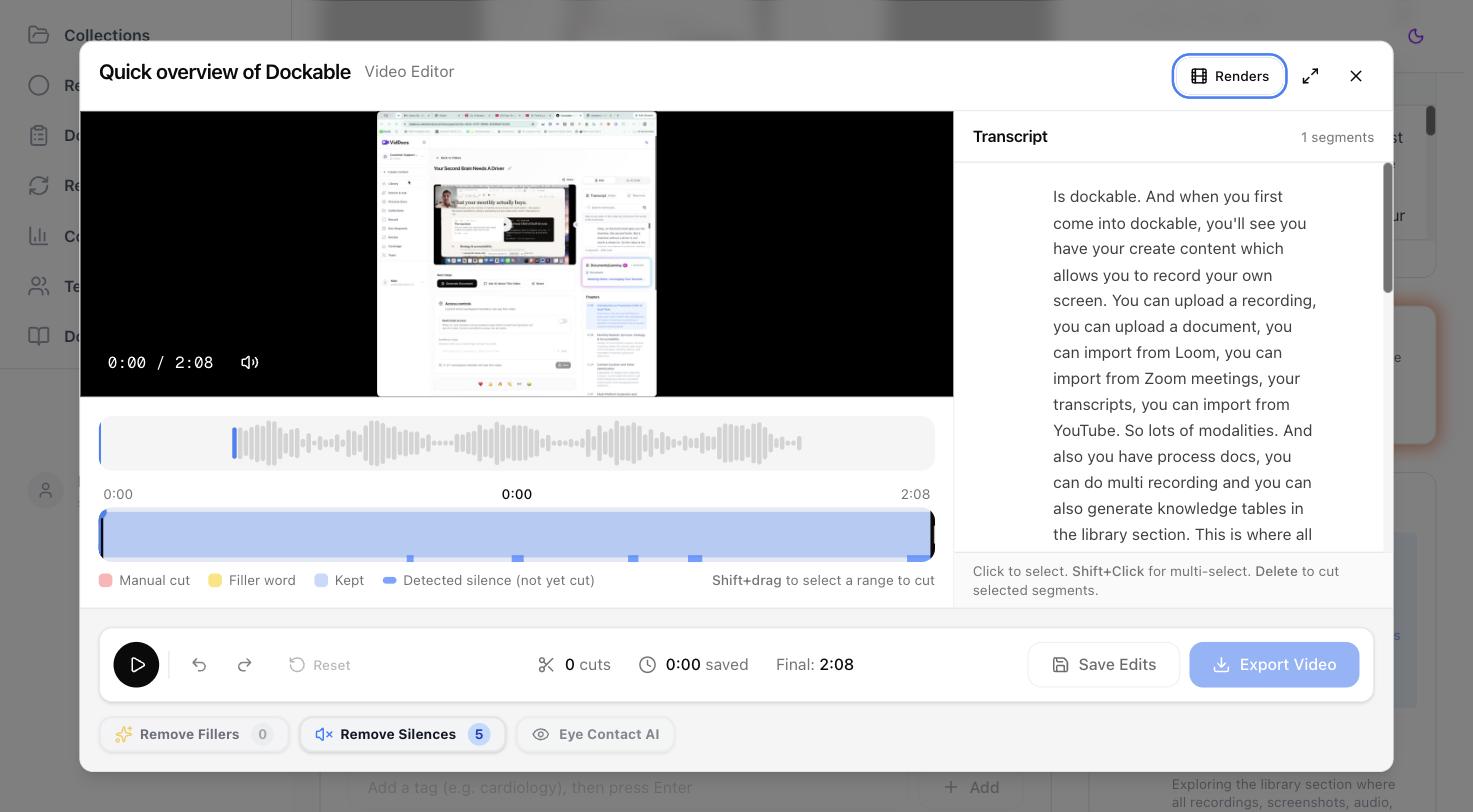
Dockable's editor is built for one job: turning a raw, rambly recording into a tight final video — without timeline-editing skills. Everything is anchored to the transcript, so you edit by reading, not by scrubbing.
Open it from a video's page: the Edit button in the Next steps card (or Edit Video in the toolbar). The editor needs a transcript, so it's available on videos recorded with narration.
Two ways to cut
From the transcript (right panel):
- Click a sentence to select it. Shift+click another to select a range.
- Press Delete. The selection becomes a cut.
From the timeline (bottom):
- Hold Shift and drag across the region you want to remove.
- Click Cut Selection (or press Delete).
Cuts don't destroy anything — they mark regions to skip. Playback in the editor jumps over your cuts, so pressing play shows you a live preview of the final result.
Trim the start and end
Drag the dark handles at either end of the timeline inward to trim dead time from the beginning or end of the recording.
Reading the timeline
- Blue regions — kept content.
- Red blocks — manual cuts.
- Yellow blocks — filler-word cuts.
- Gray blocks — silence cuts.
- Thin blue strips along the bottom edge — detected silences that haven't been cut yet. Click one to jump there and listen before deciding.
The footer shows a running count of cuts, total time saved, and the final duration.
Undo, redo, and reset
- Cmd+Z undoes; Cmd+Shift+Z redoes — with deep history, so experiment freely.
- Reset clears every cut and trim back to the original.
- Save Edits stores your cut list without rendering, so you can come back later.
Keyboard shortcuts
- Space — play/pause
- Delete — cut the selection
- Cmd+Z / Cmd+Shift+Z — undo / redo
- Escape — clear the current selection
FAQ
Does editing change the original video?
Never. Cuts are a saved edit; the original stays untouched until you explicitly Export, which renders a new file alongside the original. See Exporting your edit.
Why is Edit disabled on my video?
The editor works from the transcript, so silent (no-narration) videos can't be edited here. Recordings made with the mic on always can.